InuTattoo Script: A Practical Evaluation of This Tattoo-Inspired Typeface
When evaluating a decorative typeface for professional use, it is easy to be drawn in by style alone. InuTattoo Script enters a crowded field of display fonts with a specific promise: to deliver the raw, hand-drawn energy of tattoo lettering without sacrificing readability or versatility. After spending considerable time working with it across several projects, I can offer a grounded look at what it actually does, where it excels, and where it might fall short for your particular workflow.
What InuTattoo Script Actually Is
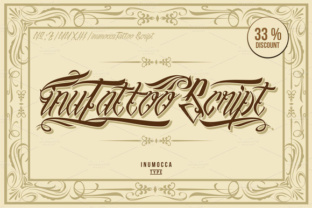
InuTattoo Script is a hand-drawn, brush-style typeface designed to emulate the look of custom tattoo script. Unlike many script fonts that lean toward calligraphic elegance or casual handwriting, this one borrows from the bold, often gritty aesthetic found in traditional and neo-traditional tattoo work. The characters carry irregular stroke weights, slight ink bleed effects, and a deliberately imperfect baseline that gives each glyph a hand-stamped quality.
The name itself hints at its visual roots: "Inu" references the Japanese word for dog, and the lettering style carries a subtle nod to the bold linework found in Japanese tattooing. However, the typeface is not culturally narrow. It works across a range of tattoo-inspired aesthetics, from old-school sailor styles to more contemporary blackwork.
Stroke Variation and Texture
The most noticeable feature of InuTattoo Script is its uneven stroke thickness. Letters swell and taper in ways that feel natural rather than mechanical. This is not a font that was smoothed into uniformity. Each character retains a hand-drawn roughness, which is exactly the point. For designers who need an authentic tattoo look, this texture eliminates the need for additional distressing or brush effect overlays.
Letter Spacing and Kerning
Out of the box, the default letter spacing is tighter than many script fonts. This works well for short phrases, logos, and headlines where you want the words to read as a single gestural mark. For longer text strings, you will likely want to adjust tracking manually. The kerning pairs are generally solid for common letter combinations, but some less common pairs may need manual tweaking in your design software.
Character Set and Language Support
InuTattoo Script includes a respectable set of glyphs for a specialty display font. You get uppercase and lowercase letters, numerals, punctuation, and basic diacritics. It covers most Western European languages, which is sufficient for the majority of commercial projects. If you need extended language support for Central or Eastern European languages, you may want to verify coverage before committing.
Authenticity Without Extra Work
The single greatest strength of InuTattoo Script is how much authenticity it brings straight out of the box. Many script fonts that aim for a tattoo look end up feeling like clean calligraphy with a few rough edges added. This one reads as if it was actually drawn with a tattoo machine. The inconsistent pressure, the slight wobble in long curves, and the natural ink pooling at stroke ends all contribute to an effect that would otherwise require hours of manual detailing in vector software.
Versatility Across Media
I have used InuTattoo Script in both digital and print contexts, and it holds up well in both. On screen, it looks crisp at headline sizes and retains its character even at smaller sizes, provided you do not go below 18–20 points. In print, it handles offset and digital printing without losing its rough edges. It also works well for apparel graphics, signage, and packaging where a hand-done feel is part of the brand identity.
Pairing Potential
Despite its strong personality, InuTattoo Script pairs well with clean sans-serif typefaces. A combination like InuTattoo Script for a headline and a neutral sans-serif for body text creates a balanced contrast that feels intentional rather than chaotic. It also works alongside other rough or distressed fonts, though you should be careful not to overload a layout with competing textures.
Branding and Logo Design
For brands in the tattoo industry, barber shops, streetwear, craft breweries, and music venues, InuTattoo Script is a strong candidate. It communicates a specific vibe: handcrafted, unpolished in a deliberate way, and connected to subculture aesthetics. I have seen it used effectively in shop logos, event posters, and product labels. The typeface reads as confident and unpretentious, which is exactly what many of these brands need.
Social Media and Digital Content
On platforms like Instagram and TikTok, where visual authenticity matters, InuTattoo Script performs well. It stands out in a feed full of clean sans-serif and polished script fonts. For quote graphics, announcement posts, and story highlights, it adds a tactile quality that encourages engagement. Just be aware that at very small sizes on mobile screens, some of the finer stroke details may get lost, so keep your text large enough to preserve readability.
Packaging and Merchandise
When applied to product packaging, especially for limited-run or artisanal items, InuTattoo Script reinforces the handmade angle. It works particularly well on kraft paper, matte finishes, and dark backgrounds where the ink-bleed effect can pop. For apparel, it screen prints cleanly without losing its rough edges, provided the design is not overly complex.
File Formats and Installation
InuTattoo Script typically ships as both OTF and TTF files, which cover most design software needs. Installation is straightforward on both macOS and Windows. The font includes OpenType features such as stylistic alternates and ligatures, which add flexibility if your software supports them.
Learning Curve
There is almost no learning curve for the designer. You install it, select it, and start typing. The main adjustment is learning where manual kerning is needed and understanding the size limits for readability. For most users, this is not a barrier.
Consistency and Reliability
InuTattoo Script is consistent in its inconsistency. The intentional roughness is applied evenly across the character set, so you do not get a font where some letters look hand-drawn and others look vector-perfect. This reliability is important for professional work. You can trust that the font will maintain its visual cohesion across different words and sizes.
Who Benefits Most from InuTattoo Script
This typeface is not for everyone, and it is not trying to be. It is best suited for:
- Tattoo shop owners and artists who need a font that reflects their craft without requiring custom lettering every time.
- Streetwear and lifestyle brands looking to establish a raw, hand-done visual identity.
- Graphic designers who work with music, event, or subculture clients and need a reliable display font for posters, flyers, and merchandise.
- Small business owners in service or product categories where authenticity and handcrafted appeal are part of their brand story.
- Content creators and social media managers who want their text overlays to feel more personal and less corporate.
If your work leans toward corporate clean, minimalist, or high-fashion aesthetics, InuTattoo Script will likely feel out of place. It is a tool for specific contexts, and its value is highest when used in those contexts.
Practical Recommendations for Getting the Most Out of It
- Use it at display sizes. For body text or small captions, choose a more legible font. InuTattoo Script is designed to be seen, not skimmed.
- Pair it with a clean sans-serif. This creates a clear hierarchy and lets the script shine without competing with other decorative elements.
- Adjust tracking manually. The default spacing works for short words, but for longer phrases, open up the tracking slightly to maintain readability.
- Test it on your actual output medium. How it looks on screen at 100% zoom may differ from how it prints on a t-shirt or a sticker.
- Use stylistic alternates sparingly. A little variation adds interest; too much can make the text feel disjointed.
Possible Limitations to Keep in Mind
No font is perfect, and InuTattoo Script has its constraints. The most obvious is its limited size range. At small sizes, the stroke variations can make letters look muddy or hard to read. If your project requires fine print or detailed text at 14 points or below, this is not the right choice.
Another consideration is its stylistic specificity. Because the font carries such a strong visual identity, it can overwhelm a layout if used too broadly. It works best as an accent or headline font, not as the sole typeface for a full document or website.
Finally, the language support, while adequate for common use, does not extend to non-Latin scripts or extended character sets. If your audience reads in Cyrillic, Greek, or other non-Latin alphabets, you will need a different solution.
Long-Term Value and Fit for Your Workflow
InuTattoo Script is not a trend font. Its aesthetic is rooted in established tattoo traditions, which means it will not feel dated in a few years the way some hyper-stylized display fonts do. For professionals who regularly work with brands or projects that call for this specific look, it is a worthwhile investment. It saves time, delivers consistent quality, and gives you a reliable tool for a niche that is often underserved by standard font libraries.
For someone who occasionally needs a tattoo-style font, it may still be a good addition to your collection. The key is recognizing when it fits and when to reach for something else. Using it sparingly and intentionally will always yield better results than forcing it into a project where its personality does not belong.
Ultimately, InuTattoo Script earns its place in a professional toolkit by doing exactly what it promises: delivering authentic, hand-drawn tattoo lettering that works across media, saves production time, and communicates a specific, grounded visual language. If that matches your needs, it is a font worth taking seriously.